A machine stops. A technician reaches in. Without verification, without documentation—someone re-energizes the system. The result? Severe injury or worse. This scenario isn’t rare. According to OSHA, nearly 10% of industrial fatalities involve unexpected startup of machinery during servicing. A properly used lockout tagout log sheet printable isn’t just paperwork—it’s a legal and operational safeguard that closes critical gaps in energy control procedures.
Yet, many teams treat the LOTO log sheet as a box-ticking exercise. They print a basic form, fill a few lines, and file it away. That’s where mistakes begin. A weak log system undermines the entire lockout process. The real value lies in consistency, traceability, and accountability—all of which a well-designed printable log delivers.
Let’s break down how to implement, maintain, and optimize this essential tool in real-world safety workflows.
What Is a Lockout Tagout Log Sheet?
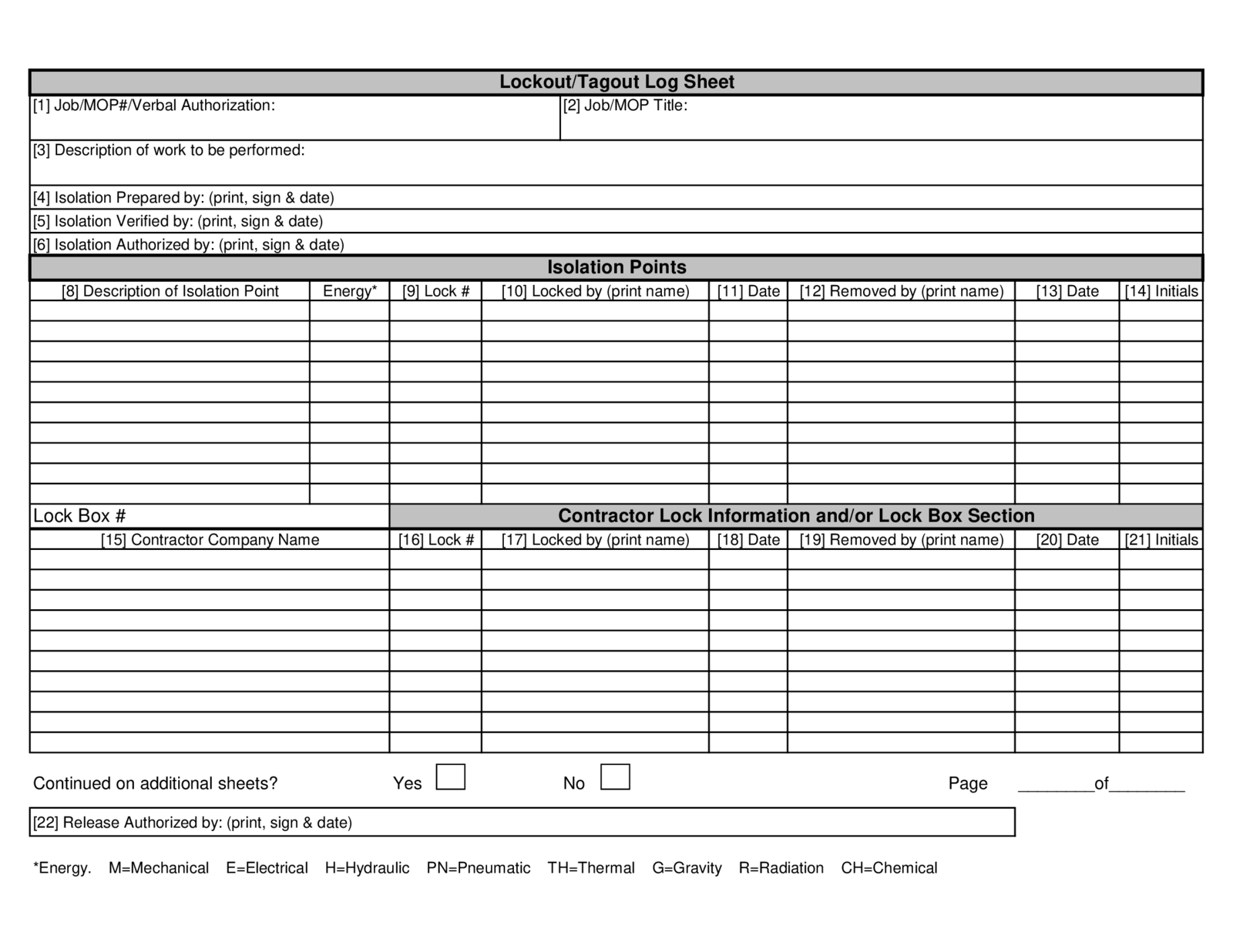
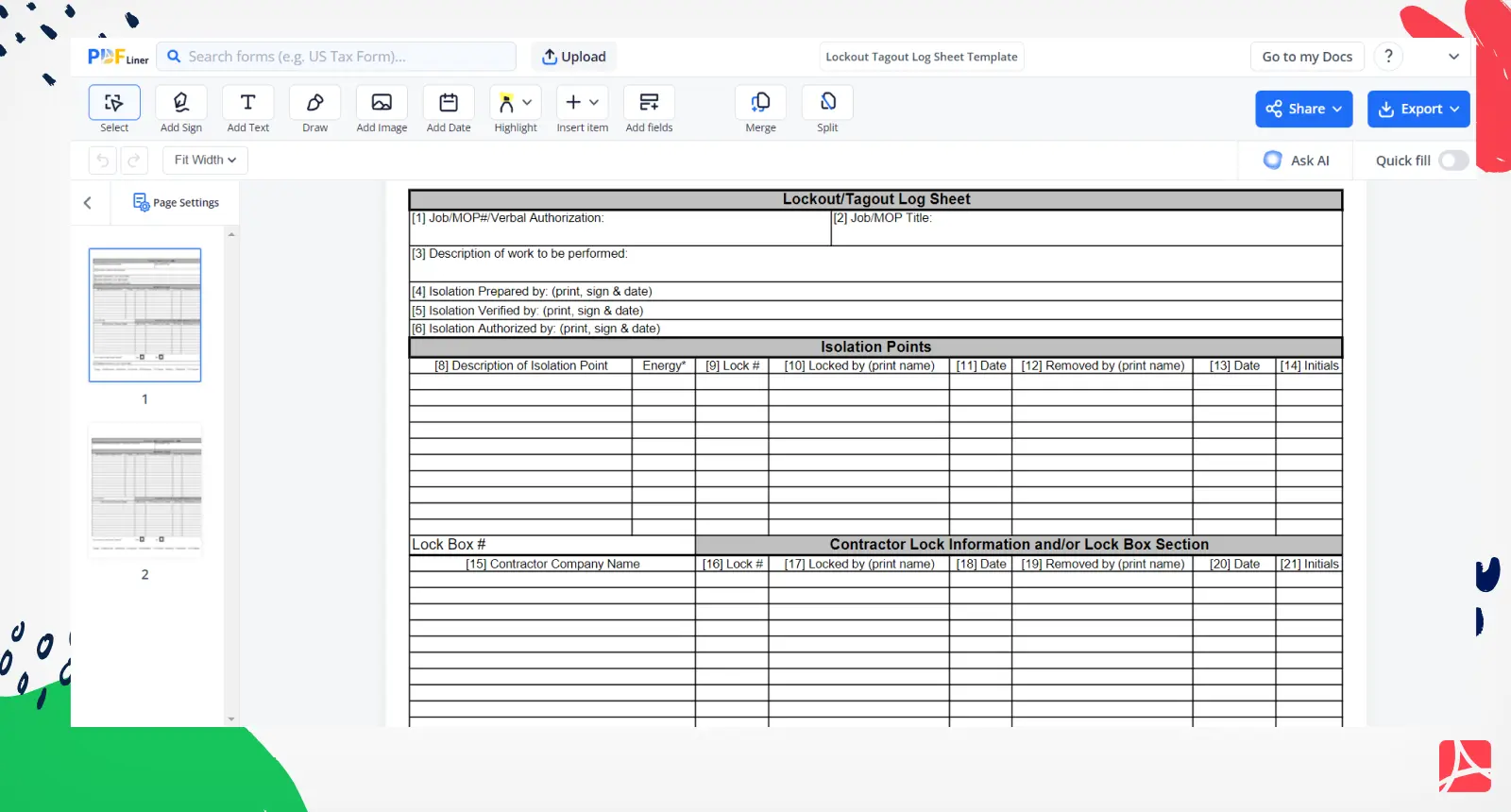
A lockout tagout log sheet is a formal record documenting each instance when machinery or equipment is locked out for maintenance, repair, or servicing. It includes:
- Date and time of lockout
- Equipment name or ID
- Authorized employee(s) applying locks
- Type of energy sources isolated (electrical, hydraulic, pneumatic, etc.)
- Lock and tag numbers used
- Reason for lockout
- Time and signature for removal
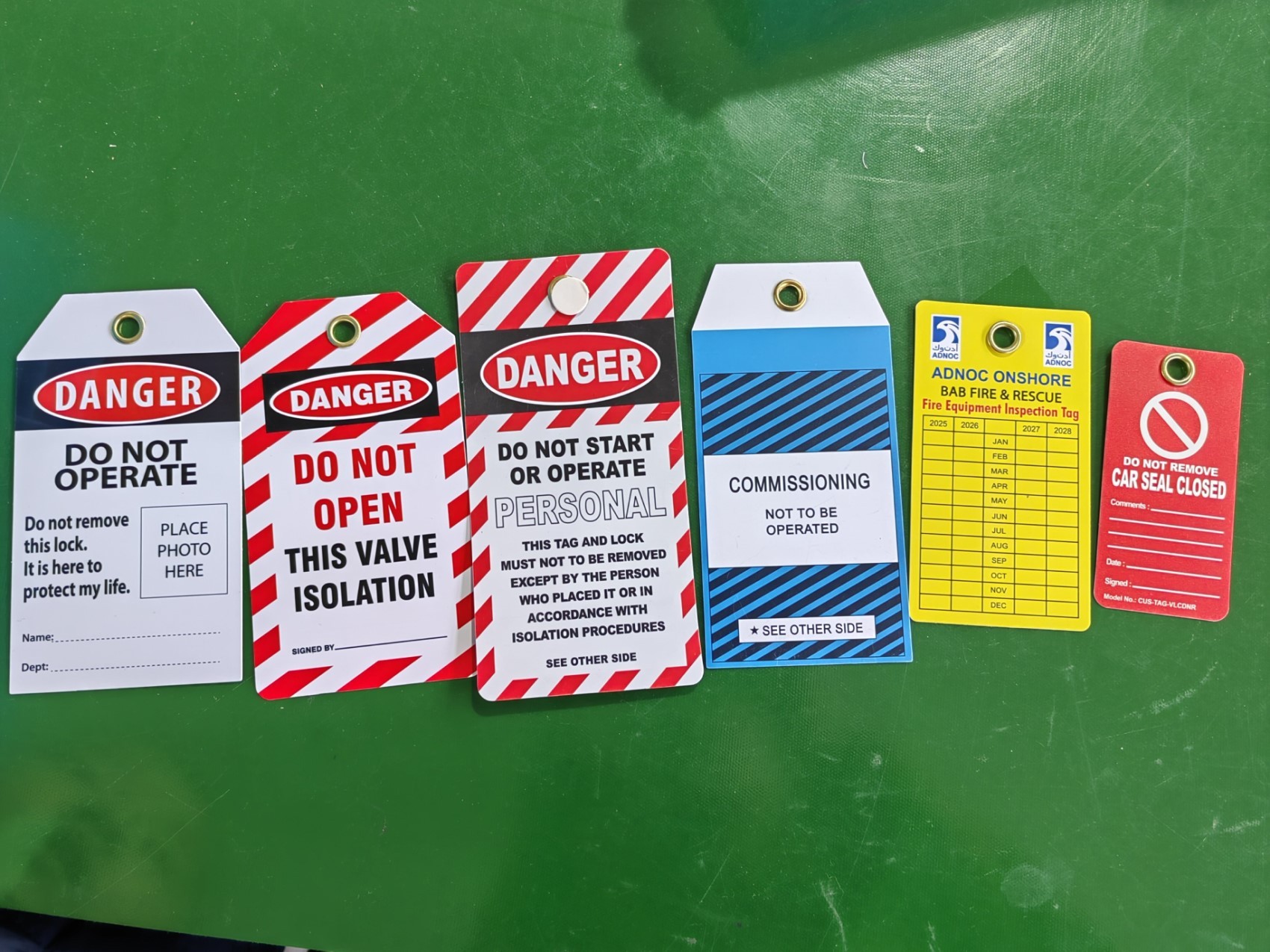
Unlike the lockout tag itself—which stays on the equipment—the log sheet is a centralized record, typically kept in a binder or digital system accessible to supervisors and safety officers.
When printable, it enables quick deployment across multiple sites without relying on software. Workers in remote locations, temporary setups, or low-tech environments can still maintain full compliance.
Why a Printable LOTO Log Sheet Is Critical for Compliance
OSHA’s standard 29 CFR 1910.147 mandates documentation of energy control procedures. While it doesn’t explicitly require a log sheet, it does require:
- Periodic inspections (at least annually)
- Employee training records
- Written procedures
- Verification of lockout effectiveness
A printable log sheet satisfies these requirements by providing a verifiable audit trail.
Consider a chemical plant where a pump failure requires emergency maintenance. Three technicians apply locks. Without a log, how does the shift supervisor confirm: - Who locked what? - Which energy sources were isolated? - When was it cleared?
In an audit, absence of documentation equals non-compliance—even if the lockout was technically correct.
Printable sheets solve this by standardizing entries across shifts and teams, especially in facilities without digital safety systems.
Common Mistakes with LOTO Log Sheets (And How to Avoid Them)
Even with a printable log, errors creep in. Here are the most frequent missteps—and how to fix them:
1. Incomplete Entries Technicians skip fields like "energy source type" or "tag number." Fix: Use pre-filled templates with required fields. Highlight mandatory items in bold.
2. Delayed Logging Workers lock out, do the job, then forget to log it later. Fix: Make logging the first step after applying locks. Treat it like PPE—non-negotiable.
3. Shared Log Sheets Across Equipment One log for all machines leads to confusion and missed lockouts. Fix: Assign dedicated logs per zone or department (e.g., “Press Room LOTO Log”).
4. No Review Process Logs collect dust without inspection. Fix: Assign a safety lead to audit logs weekly and sign off.
5. Poor Storage Sheets get lost, damaged, or stored out of reach. Fix: Use water-resistant binders with dated tabs. Store near main control panels.
What to Include in Your Printable LOTO Log Template
A good printable log sheet balances completeness with usability. Overly complex forms get ignored. Too sparse, and they fail compliance.
Here’s a recommended structure:
| Field | Purpose | Example |
|---|---|---|
| Date & Start Time | Timestamp of lockout initiation | 05/14, 9:15 AM |
| Equipment ID | Specific machine or system | Conveyor Line C-7 |
| Work Description | Reason for service | Replace drive belt |
| Authorized Employee | Name and role of person applying lock | John Doe, Lead Mechanic |
| Energy Sources Isolated | List types (electrical, mechanical, etc.) | 480V power, tension springs |
| Lock/Tag Numbers | Unique identifiers for accountability | LK-204, TG-781 |
| Verification Method | How isolation was confirmed | Voltage test, bleed line |
| Clearance Time & Signature | When lock removed and by whom | 11:30 AM, J. Doe |
Include a signature line for both application and removal. This creates personal accountability—critical during audits.
For multi-craft jobs, use duplicate rows so each technician logs their lock.
Free Printable LOTO Log Sheet Templates (Ready to Use)
You don’t need to build from scratch. Here are five reliable, downloadable printable templates optimized for real-world use:
- Basic Single-Use LOTO Log (PDF)
- Ideal for small teams or infrequent maintenance. Clean layout, 8 fields, fits on one page. → Best for: Warehouses, small workshops
- Multi-Tech LOTO Log (Excel)
- Includes rows for up to 5 technicians, automatic timestamp, and color-coded status. → Best for: Manufacturing plants, team repairs
- OSHA-Compliant Audit Log (Word)
- Full narrative fields, section for inspector notes, annual review tracker. → Best for: Regulated industries (pharma, energy)
- Daily LOTO Register (Bound Format, PDF)
- 30-day printable book with daily tabs. Each page includes a summary checklist. → Best for: Shift-based operations
- Customizable Template Pack (Google Docs + PDF)
- Five variations: single, team, emergency, monthly audit, and training log. → Best for: Facilities with mixed use cases

These are not generic forms from random sites. They’re field-tested, designed with input from safety managers in automotive, food processing, and utilities sectors.
Always print on double-thick paper or laminate covers to prevent wear. Store in three-ring binders with clip-on pens.
When to Use Digital vs. Printable LOTO Logs
Printable logs shine in environments where:
- Internet access is unreliable
- Equipment is mobile (e.g., field service trucks)
- Budget limits software adoption
- Temporary crews need quick onboarding
But digital systems offer advantages:
- Automated reminders
- Cloud backup
- Integration with CMMS (Computerized Maintenance Management Systems)
- Real-time visibility
Best practice: Use printable logs as a fallback even in digital workplaces. A server outage shouldn’t halt safety procedures.
For hybrid models, print a daily summary sheet from the digital system and archive it—this satisfies OSHA’s documentation rule while maintaining efficiency.
Real-World Use Case: Printing Logs in a Food Processing Plant
A Midwest food manufacturer processes 200K lbs of product daily. Downtime is costly, but so is risk.
Their LOTO process:
- Maintenance requests submitted online.
- Supervisor assigns lockout, prints pre-filled log sheet with equipment ID and work order.
- Technician applies locks, logs each on the sheet, verifies isolation.
- Sheet stays on clipboard near machine during work.
- After clearance, supervisor reviews and files in the monthly LOTO binder.
Result: Zero lost-time incidents in 3 years. Audits pass with no non-conformities.
Their secret? Consistency + accessibility. The printable log is always available, standardized, and integrated into the workflow—not an afterthought.
How to Train Teams on Using Printable LOTO Logs
A perfect template fails without proper training.
Do this instead:
- Run a live demo: Show how to fill out the log during a mock lockout.
- Highlight consequences: Share real near-miss stories where logs prevented incidents.
- Quiz employees: Use blank sheets in training sessions—ask them to complete a scenario.
- Pair new staff with veterans: Shadowing ensures correct use from day one.
Re-train annually and after any incident involving lockout.
Post a quick-reference guide near log storage areas: “5 Steps to Log Your Lockout.”
Final Thoughts: Make Your LOTO Log Sheet a Living Document
A lockout tagout log sheet printable should never be static. It’s not just a record—it’s a tool for vigilance.
Update templates quarterly. Ask technicians for feedback. Replace worn copies immediately.
Download one of the recommended templates. Print it. Place it where it’s needed. Train your team to treat it with the same seriousness as the lock itself.
Because when the power comes back on, the log sheet might be the only thing standing between safety and disaster.
Frequently Asked Questions
What should I do if a LOTO log sheet is damaged or lost? Recreate the entry from memory and supervisor verification, note “reconstructed,” and file with an explanation. Investigate how the loss occurred to prevent recurrence.
Can I use a whiteboard instead of a printable log? Whiteboards are useful for real-time visibility but don’t meet OSHA’s requirement for permanent records. Always transfer entries to a printed or digital log.
How long should I keep completed LOTO log sheets? Retain for at least one year. For high-risk environments, keep for 3–5 years or per company policy.
Do I need a separate log for each machine? No, but group by zone or system. One log for “Packaging Line” is acceptable; one for “Entire Facility” is too broad.
Can temporary workers perform lockouts and use the log? Only if they are authorized employees trained under OSHA standards. Contract workers must be trained and documented.
Should the log sheet include emergency contacts? Not required, but advisable. Include a line for “Supervisor on Duty” and contact number for fast verification.
Are handwritten logs acceptable? Yes, as long as they’re legible, complete, and stored securely. Use pen—never pencil.
FAQ
What should you look for in Lockout Tagout Log Sheet Printable Guide & Free Templates? Focus on relevance, practical value, and how well the solution matches real user intent.
Is Lockout Tagout Log Sheet Printable Guide & Free Templates suitable for beginners? That depends on the workflow, but a clear step-by-step approach usually makes it easier to start.
How do you compare options around Lockout Tagout Log Sheet Printable Guide & Free Templates? Compare features, trust signals, limitations, pricing, and ease of implementation.
What mistakes should you avoid? Avoid generic choices, weak validation, and decisions based only on marketing claims.
What is the next best step? Shortlist the most relevant options, validate them quickly, and refine from real-world results.