Safety doesn’t start with policy—it starts with conversation. And in high-risk environments like construction, manufacturing, or utilities, that conversation often begins with a toolbox talk. Yet too many teams treat these briefings as box-ticking exercises. The result? Low engagement, missed hazards, and preventable incidents.
A well-structured toolbox talk template example can transform this routine into a meaningful safety ritual. Not all templates are equal. The best ones are clear, actionable, and easy to adapt—without sacrificing compliance or depth.
Here’s how to build and use a toolbox talk template that actually works, with a real-world example you can start using today.
Why Most Toolbox Talk Templates Fail
Many companies download generic templates from the internet and assume they’re set. But a one-size-fits-all approach backfires. Workers tune out when topics don’t reflect their daily tasks. Supervisors rush through content, skipping questions. And if the form doesn’t capture insights or actions, nothing changes.
Common flaws include:
- Overly complex language – Jargon-heavy forms confuse more than they clarify.
- Lack of customization – A template for crane safety won’t help an electrician working on live panels.
- No follow-up mechanism – If actions aren’t assigned or tracked, the talk has zero accountability.
- Poor readability – Dense blocks of text discourage participation.
The goal isn’t just documentation—it’s behavior change. A strong toolbox talk template example must support that mission.
Core Elements of an Effective Toolbox Talk Template
An effective template isn’t just a form—it’s a framework for dialogue. It should guide the facilitator, engage the team, and create a record that adds value.
Here’s what every high-impact toolbox talk template should include:
#### 1. Header Information Capture basics for tracking and compliance: - Date and time - Location/job site - Facilitator name and role - Crew or team members present (with signatures)
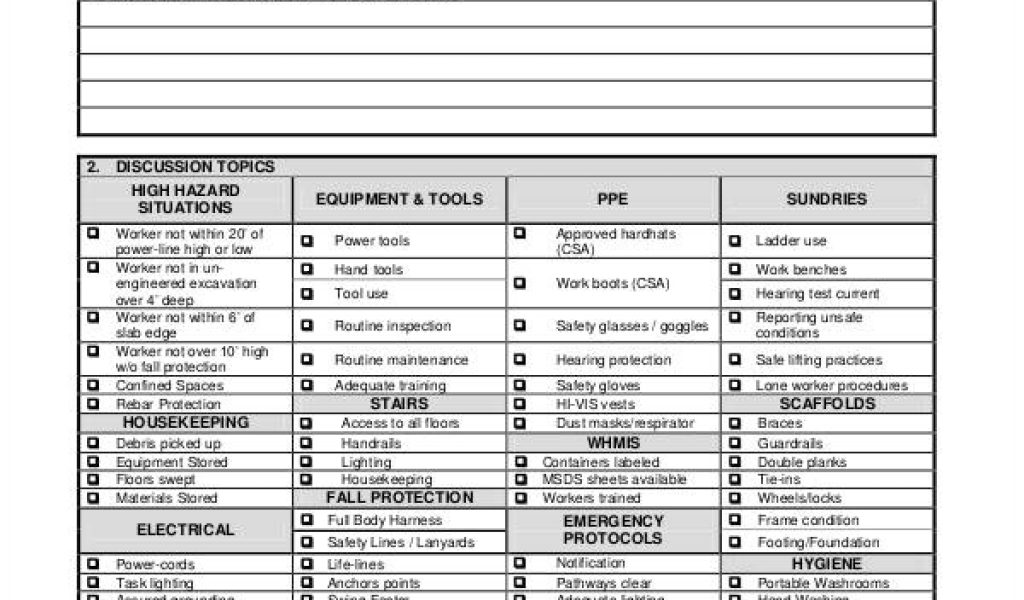
#### 2. Topic Selection Pre-fill a list of common topics or allow selection from a rotating schedule: - Fall protection - Electrical safety - Ladder use - PPE requirements - Hazard communication - Equipment inspection
#### 3. Hazard Identification Prompt discussion with questions like: - What hazards are present in today’s work? - Have conditions changed since yesterday? - Are new tools or materials being used?
This section turns passive listening into active participation.
#### 4. Safe Work Procedures Outline correct practices clearly and concisely: - Step-by-step instructions - Reference to site-specific rules or permits - Visual cues (e.g., “Inspect harness before each use”)
Avoid vague statements like “be careful.” Replace them with specific actions.
#### 5. Discussion & Questions Leave space for team input: - “Has anyone experienced a close call related to this?” - “What would you do if you saw a coworker bypassing a guard rail?”
This builds ownership and surfaces hidden risks.
#### 6. Action Items & Follow-Up Document any next steps: - Who is responsible? - What needs correction? - When will it be reviewed?
Without this, talks become performative.
#### 7. Sign-Off Section Collect signatures to confirm attendance and understanding. Digital or paper-based—consistency matters.
Realistic Toolbox Talk Template Example
Here’s a practical, field-tested example you can adapt:
Toolbox Talk Record
Date: [Insert Date] Time: [Insert Time] Location: [Site Name, Area/Zone] Facilitator: [Name, Role]
Topic: Fall Protection at Heights (Roof Work)
Team Members Present: [Name] – Signature [Name] – Signature (List all attendees)
1. Hazards Identified: - Unprotected roof edges - Slippery surfaces due to morning dew - Improper ladder setup - Lack of anchor points for harnesses
2. Safe Work Procedures: - All workers must wear 100% tie-off harnesses when near roof edges. - Inspect lanyards and anchors before use—no fraying or damage. - Use warning lines or physical barriers where guardrails aren’t installed. - Ladders must extend 3 feet above landing point and be secured.
3. Discussion Points: - “What should you do if your harness fails a pre-use check?” - “Has anyone seen near-misses with fall protection this week?” - “How do we ensure new hires understand tie-off requirements?”
4. Worker Input: - John noted dew caused a slip last week—suggest morning inspections. - Maria reminded team to store lanyards in dry containers overnight.
5. Actions & Assignments: - Supervisor to verify anchor points by 9:00 AM – Assigned to: Alex - Place non-slip mats at ladder bases – Assigned to: Maintenance - Retrain new hires on harness use – Scheduled: Tomorrow, 7:30 AM
6. Sign-Off: All attendees confirm they understand the hazards and procedures discussed.
Facilitator Signature
Safety Officer (if applicable)
This format is clean, focused, and designed for real-world use. It doesn’t require special software and takes under 15 minutes to complete.
Common Mistakes to Avoid
Even with a solid template, execution matters. Watch for these pitfalls:
- Repeating the same topic weekly – Workers disengage. Rotate topics based on current work.
- One-way delivery – A monologue isn’t a talk. Ask open-ended questions.
- Skipping attendance records – OSHA can cite incomplete documentation.
- Using generic examples – “Falls are dangerous” is weak. Use site-specific scenarios.
- Holding talks in noisy or distracting areas – Move to a quiet zone or trailer.
Also, avoid holding talks at the end of shifts. Focus degrades. Morning or pre-task briefings are far more effective.
When to Customize Your Template
A static template becomes outdated fast. Adapt it based on:

#### Project Phase - Excavation: Focus on trench safety, soil classification, shoring - Framing: Emphasize fall protection, nail gun safety, overhead hazards - Electrical rough-in: Lockout/tagout, arc flash, PPE levels
#### Crew Composition - New hires? Add orientation checkpoints. - Subcontractors? Include scope-specific rules and emergency contacts.
#### Incident Trends If near-misses spike in material handling, shift focus to lifting techniques or forklift operations.
Smart teams review their template quarterly and adjust based on safety data.
5 Tools to Streamline Toolbox Talks (and Avoid Clunky Software)
You don’t need enterprise software to run effective talks—but the right tool helps. Here are five practical options, from low-tech to digital:
| Tool | Best For | Pros | Cons |
|---|---|---|---|
| Paper Templates (PDF/Print) | Small crews, low-budget sites | Free, no training needed, always accessible | Hard to track, prone to loss, no analytics |
| Google Forms + Sheets | Teams wanting digital records | Free, easy sharing, automatic summaries | Limited offline use, basic interface |
| SiteDocs | Mid to large contractors | Full EHS suite, integrates with inspections | Expensive, steep learning curve |
| iAuditor by SafetyCulture | Real-time reporting & audits | Mobile-first, photo uploads, templates library | Subscription model adds up |
| GoCanvas | Custom forms & workflows | Highly customizable, offline capable | Overkill for simple talks |
For most teams, a hybrid approach works: use a printed template for the field, then log key data in a spreadsheet. Digitize only when volume justifies cost.
Making Toolbox Talks Actually Matter
A template is just a tool. Culture determines impact.
The best supervisors do three things:
- Link talks to real work – If today’s task involves confined spaces, talk about confined spaces—not generic PPE.
- Encourage honest feedback – Reward workers who speak up about hazards.
- Follow up visibly – Fix the issue discussed, then mention it in the next talk: “Remember the loose handrail? It’s been replaced.”
This builds trust and shows that safety isn’t just talk.
Also, vary the facilitator. Let experienced workers lead occasionally. It boosts engagement and spreads safety leadership.
Final Template Checklist Before Use
Before rolling out your toolbox talk template example, verify it includes:
- [ ] Clear space for date, location, and attendees
- [ ] Topic-specific hazard prompts
- [ ] Actionable safety steps, not vague advice
- [ ] Open-ended discussion questions
- [ ] Section for action items with ownership
- [ ] Signature lines for accountability
- [ ] Room for worker input and observations
If your template misses any of these, revise it. A checklist is only useful if it’s used.
A great toolbox talk template doesn’t just document—it drives safer behavior. Start with a proven structure, tailor it to your crew’s needs, and prioritize conversation over compliance. Use the example above as a foundation, then refine it through real-world use. Safety improves not when you have the perfect form, but when your team believes the talk matters. Make it matter.
FAQ
What should you look for in Toolbox Talk Template Example for Real-World Safety? Focus on relevance, practical value, and how well the solution matches real user intent.
Is Toolbox Talk Template Example for Real-World Safety suitable for beginners? That depends on the workflow, but a clear step-by-step approach usually makes it easier to start.
How do you compare options around Toolbox Talk Template Example for Real-World Safety? Compare features, trust signals, limitations, pricing, and ease of implementation.
What mistakes should you avoid? Avoid generic choices, weak validation, and decisions based only on marketing claims.
What is the next best step? Shortlist the most relevant options, validate them quickly, and refine from real-world results.